Make your videos about twice as fast
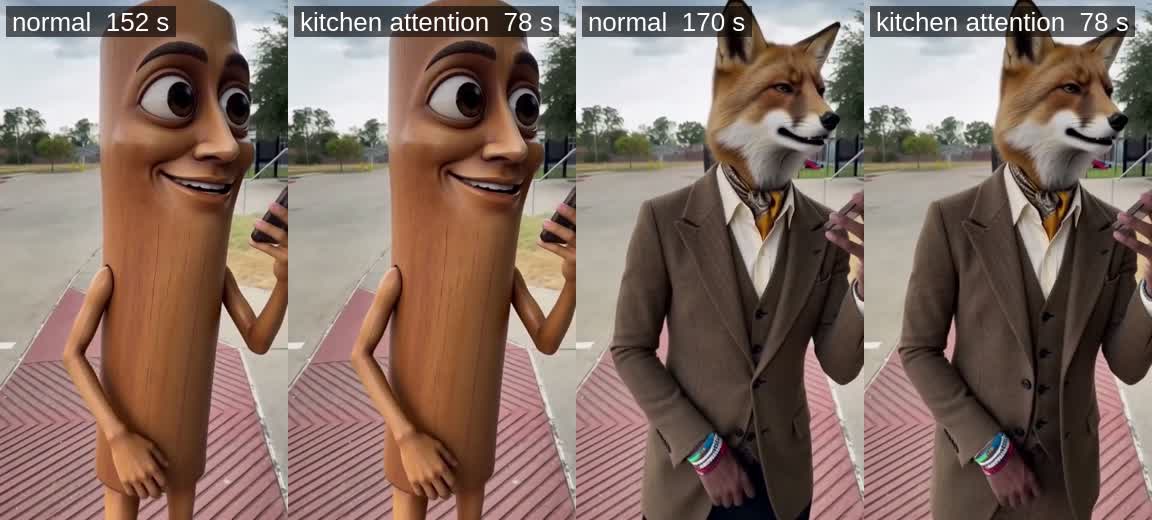
ComfyUI has a faster way to do the heaviest part of making a video, called kitchen attention. It is off unless you turn it on. Turning it on takes about a minute, and the video comes out practically the same.
- NVIDIA RTX 20, 30, 40 or 50 series, or a GTX 16 series card
- AMD Radeon RX 7000 series or newer
- ComfyUI 0.32 or newer. If you are not sure, update ComfyUI first.
- Older NVIDIA cards (GTX 10 series and before), Mac, and CPU only
Not sure about your card? Try it anyway. If your card can't use it, ComfyUI quietly keeps the normal way and nothing breaks.
- Update ComfyUI.
- Double-click an empty spot on the canvas, type
attention backend, and pick Model Attention Backend. - Find the model wire that goes into your sampler (or guider). Put the new node in the middle of that wire: model in, model out.
- Set backend to comfy kitchen attention.
- Run. Save the workflow so it stays on.
Put it after your LoRA loaders, right before the sampler. It only changes how the model does its math, not what the model is.
This turns it on for every workflow you run, with no node. Add --use-ck-attention to the line that starts ComfyUI, then restart ComfyUI.
Windows portable: right-click run_nvidia_gpu.bat (run_amd_gpu.bat on AMD), pick Edit, add it to the end of the first line, save, and start ComfyUI with that file again.
.\python_embeded\python.exe -s ComfyUI\main.py --windows-standalone-build --use-ck-attention
Manual install or Linux: add it to your start command.
python main.py --use-ck-attention
Desktop app: its settings have no option for this yet. Use Way 1.
One known problem: with this launch setting, nodes that write text with a Qwen 3.5 model (for example an auto prompt or prompt upsampler) can fail with an error about "tensor strides" on some ComfyUI versions. If that happens, take the setting out again and use Way 1 instead, which only touches the video model.
Watch the console while it samples. The time per step (the s/it number on the progress bar) should drop to about half of what you had before.
Technical details
Kitchen attention is ComfyUI's own attention code from its comfy-kitchen package, which ComfyUI installs for you. It runs attention in 8-bit integer math (INT8), which is where the speed comes from. It needs NVIDIA compute capability 7.5 or newer (Turing and later) or an AMD card with WMMA (RDNA 3 and later).
The node (ModelAttentionBackend, ComfyUI 0.32+) patches only the model wired through it. The launch setting (--use-ck-attention, ComfyUI 0.32+) switches every model, text encoders included, which is why the Qwen 3.5 text-generation problem (comfy-kitchen issue #274) only shows up with the launch setting.
Measured on one RTX 5090 with the MiniMax H3 Person Swap workflow: an 8 second clip, 6 sampling steps, seed 6202, a fresh server for each setting. "First run" includes loading the models.
| Setting | s per step | First run | Second run |
|---|---|---|---|
| Normal (PyTorch attention) | 20.8 | 176 s | 136 s |
Launch setting --use-ck-attention | 10.0 | 112 s | 72 s |
| Model Attention Backend node | 9.9 | 120 s | 72 s |
| SageAttention (separate install) | 10.0 | 110 s | 72 s |
The numbers and pictures at the top come from the shipping Person Swap App job (a log character sheet and a fox on the same 8 s clip, seed 6202), each made with the node set to pytorch attention and then to comfy kitchen attention on one warm server: 23.0 and 23.1 s per step against 11.0 s, 152 s and 170 s against 78 s.
SageAttention gives the same speed here but is a separate package you have to install yourself. Kitchen attention is already part of ComfyUI.